



General Overview
Explanation of Android Enterprise
Requirements and Installation
Requirements
General Settings
Account Overview
Account Information
Global Configuration
Privacy
Role Based Access
Apple Configuration
Android Configuration
Windows Configuration
ContentBox
LDAP Configuration
App Management
In-House App DB
App Settings
App Store Settings
Remote Control
Sim Card Management
Subscription Management
General Audit Log
Mobile Management
iOS Configuration
General
Device Log (only on device level)
Asset Management (only on device level)
Asset Management (only on device level)
Security Management
Anti Theft (only on device level)
Security Configuration
End of Life (only on device level)
Restriction Settings
BYOD
Connection Management
Web Management
App Management
Android Enterprise – Fully Managed Device Configuration
General
Device Log (only on device level)
Device Settings
Asset Management (only on device level)
Security Management
Anti Theft (only on device level)
Security Configuration
End of Life (only on device level)
Restriction Settings
Connection Management
PIM Management
App Management
Enterprise App Manager
Restrictions & Settings
Enterprise App Store
Enterprise Play Store
Kiosk Mode & Launcher
Remote Control
Content Management
Additional API
Samsung KNOX
Android Enterprise - Fully Managed Device with-Work Profile (COPE)
Android Enterprise – Container Configuration
General
Asset Management (only on device level)
Security Management
Anti Theft (only on device level)
Security Configuration
End of Life (only on device level)
Restriction Settings
Connection Management
PIM Management
App Management
Enterprise App Manager
Restrictions & Settings
Enterprise App Store
Enterprise Play Store
Content Management
Android Configuration
General
Device Log (only on device level)
Device Settings
Asset Management (only on device level)
Security Management
Anti Theft (only on device level)
Security Configuration
End of Life (only on device level)
Restriction Settings
BYOD Container
Connection Management
PIM Management
App Management
Enterprise App Manager
Restrictions & Settings
Kiosk Mode & Launcher
Remote Control
Content Management
Configuration Windows 10 PC
General
Device Log (only on device level)
Asset Management (only on device level)
Security Management
Anti Theft (only on device level)
Security Configuration
Restriction Settings
BitLocker
Certificate Management
Connection Management
PIM Management
App Management
Enterprise App Manager
MacOS Configuration
General
Asset Management (only on device level)
Update Management (only on device level)
Security Management
Anti Theft
Security Configuration
Restriction Settings
Connection Management
PIM Management
Dashboard & Reporting
Multitenant Management
Additional views
Group Files
“Group Files“ represents a fundamental part ContentBox. Here you establish settings, upload documents, create new folders, etc.
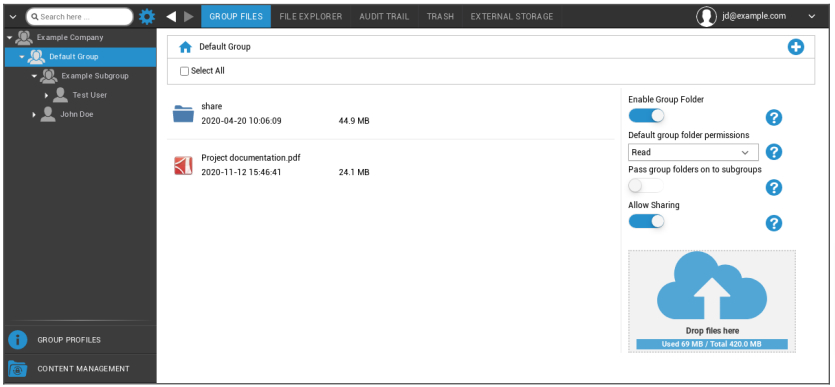
With the symbol in the upper right hand corner you can create new folders that are designated to the respective group with “Add Folder“.
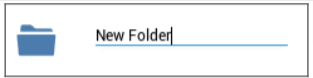
With the symbol in the upper right hand corner, you can create a new folder via “Add Folder“, that should be assigned to the respective group.
You can name the folder anything you want.
Via “Upload Files“, you can upload data. Here your Standard-Explorer will be opened. You can, of course, perform these two actions in every (sub) folder.
With the symbol in the upper left hand corner, you can return to the main menu.
You can select several folders and files and download them with “Download“ or you can erase them by clicking “Delete“.
You can also select all files and folders with and perform the “Download“ and “Delete“ commands.
When you move your mouse over a folder or file, then you will see the following overview:

- With “Rename“, you can rename the folder/file
- With “Download“, you can download the folder/file
- With “Delete“, you can delete the folder/file
Enable Group Folder | If activated, all members of the group have access to the respective folder |
Default group folder permissions | Permissions of the users in the selected group: Read = read only permission Update = update permission Create = create permission Delete = delete permission |
Pass group folders on to subgroups | If activated, the respective subgroups can have access to the parent data files |
Permissions for subgroups | Permissions of the users in the selected subgroup: Read = read only permission Update = update permission Create = create permission Delete = delete permission |
Allow Sharing | If activated, the user can share files via a link |
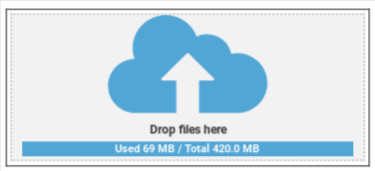
In order to upload files, you can use this field, by pulling a file via Drag & Drop to this window. You can also click on this field, in order to select and upload a file with the help of Internet Explorer.