概况
要求和安装
常规设置
隐私权
基于角色的访问
安卓配置
Windows 配置
内容框
LDAP 配置
应用程序管理
内部应用程序 DB
应用程序设置
应用程序商店设置
遥控器
订阅管理
移动管理
iOS 配置
安全管理
防盗(仅限设备级)
报废(仅限设备级)
应用程序管理
企业应用管理器
企业应用商店
安卓企业 - 全面管理设备配置
一般情况
安全管理
连接管理
PIM 管理
应用程序管理
限制和设置
企业应用商店
企业 Play 商店
信息亭模式和启动器
遥控器
安卓企业 - 带工作配置文件的完全托管设备 (COPE)
安卓企业 - 容器配置
安全管理
连接管理
PIM 管理
应用程序管理
安卓配置
一般情况
安全管理
PIM 管理
应用程序管理
遥控器
配置 Windows 10 电脑
一般情况
安全管理
防盗(仅限设备级)
限制设置
PIM 管理
MacOS 配置
一般情况
更新管理(仅限设备级)
仪表板和报告
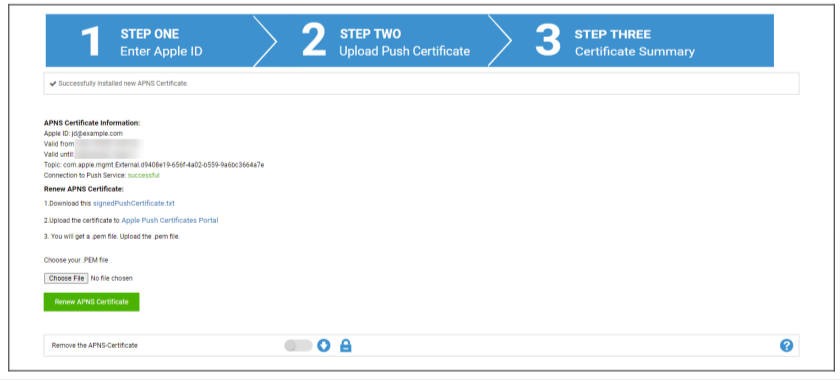
步骤 2
- 下载 signedPushCertificate.txt
- 访问https://identity.apple.com/pushcert/并使用步骤 1 中的 Apple ID 登录
- 点击 “创建证书
- (可选)输入备注。如果您管理多个租户,这将有助于轻松识别他们。
- 点击 “选择文件”,选择之前下载的 signedPushCertificate.txt 文件
- 点击 “上传”。
- 现在您将看到创建 APNS 证书的确认信息。
- 点击 “下载 “并保存。
- 返回管理控制台。
- 点击 “选择文件”,选择要上传的 APNS 证书。
- 点击 “上传